
How to Increase Pinterest Traffic in 4 Simple Steps

Whether you’re doing all the things or don’t know where to start, this blog will teach you how to increase Pinterest traffic from dream clients. From learning how the Pinterest platform works to strategically getting your content seen, I’m sharing my expert tips as a Pinterest manager. Let’s dive in!
Understanding the Pinterest Platform
Before learning how to increase Pinterest traffic, we first have to understand how Pinterest works.
Pinterest is not your typical social media platform like Instagram. It’s actually a search engine similar to Google. That means it uses SEO keywords to understand content and show it to the right people who are searching for that specific content (You can find more info on Pinterest vs Instagram here).
Users on Pinterest are searching for inspiration, ideas, and solutions to their problems. According to Pinterest, 96% of top searches are unbranded! They don’t know who you are, which is good news! Your brand or business does not need to be well-known, nor do you need a following for your content to be seen. You just need strategic keywords.
Knowing why users use the platform can also help you when creating pins. Ask yourself questions like:
Am I solving a problem my ideal client is struggling with?
Am I inspiring my ideal client?
1. Increasing Pinterest Traffic with Keywords
Let’s dive a little deeper into keywords, because that’s the main way you’re going to increase Pinterest traffic.
You should use keywords basically everywhere you can put words—on your profile, boards, titles, descriptions, graphics, etc. BUT! These keywords should be used naturally! Please don’t just dump keywords in a description and call it done. Pinterest actually sees this as spammy behavior.
When you write for both the search engine and humans, you’ll see the best results while protecting your account from getting caught in the spam filter.

Where Do You Even Find Keywords?
Keyword research is super simple! Type words into the search bar to see what populates. For example, when I type “brand design,” I see “brand design ideas”, “brand design inspiration”, and “brand design logo” populate as common searches. Pinterest tells you what users are searching for!
You want to get really specific here to find what your ideal clients are searching for and what is super relevant to your content.
“Website Design” is pretty broad, but “Feminine Website Design Inspiration” is a long-tail keyword that is more specific, has less competition, and could be more relevant to a portfolio or blog page you’re promoting. Using a mix of long-tail and short-tail keywords is a good strategy for getting your pins seen by the right people.
Keyword research should come before anything else. Build a list of relevant keywords in a spreadsheet or document, so when it’s time to write pin titles and descriptions, you can be more efficient while you plug and play different keywords!
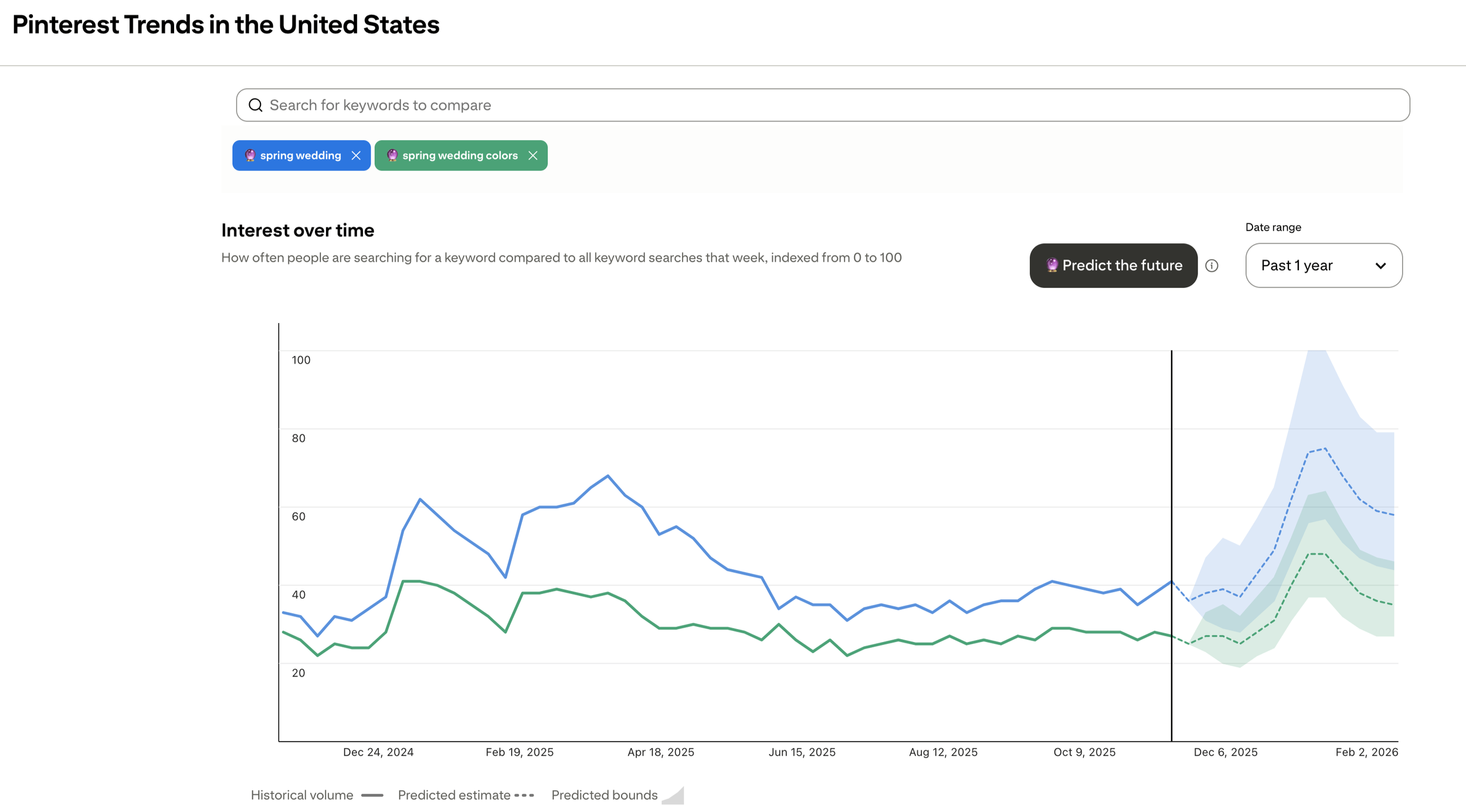
Another way to find keywords is with the Pinterest Trends Tool. You can find this in your Pinterest account by going to “Analyze performance” → “Pinterest Trends.”
This is where you’ll see when seasonal content starts trending on the platform. You can also compare keywords to one another to see which one has a higher search volume.
You’ll notice content on Pinterest starts trending ~3 months before the actual season! Which makes sense, considering Pinterest users are planners. This tool helps you look ahead to create content before it’s too late.
It also takes time for Pinterest to understand your content, so working ahead is a must for increasing your Pinterest traffic.
2. Optimize Your Pinterest Profile
After you’ve done some keyword research, it’s time to optimize your profile. This step often gets overlooked, but is super important for increasing your Pinterest traffic.
Use keywords in your bio and get really specific with the work you do and who you serve. You can also add a keyword to your name, such as “[Your Business Name] | Tampa Wedding Photographer.”
And don’t skip optimizing your Pinterest boards! Take some time to hide boards that are irrelevant to your business, and create or optimize boards that are relevant to the content you pin.
Your board titles and descriptions should be (you guessed it) filled with keywords. Board SEO gives Pinterest a better understanding of how your pins should be categorized. All that data works together to connect your pins to the right people, while in turn increasing your Pinterest traffic.
3. Improve Your Pin Graphics
Up next in learning how to increase Pinterest traffic is improving your pin graphics. With strategic keywords in place, your pins should be showing up in search results for your dream clients. But it doesn't just stop there—if you want website visits, then you need eye-catching pin graphics that encourage the click.
See what pins are showing up when you search for keywords. How can your pin graphics stand out? But remember, users don’t know who you are, so your pins should make sense without background information.
Users also need to be told what to do. On your graphic (and in your pin descriptions), use CTAs that encourage users to visit your site for more information.
4. Direct Your Pinterest Traffic to Valuable Content
Most importantly, make sure the content you’re linking to is valuable! This is where blog posts, resources, and portfolio content come into play. Answer questions your ideal clients are searching for and be a valuable resource.
And of course, make sure the content is relevant to your pin image and description. Pinterest scans your URL to check if the information is related. It’s not going to push out your content if users leave your site as soon as they land on it!
You can find content ideas for Pinterest here!
*It All Starts with Your Content Strategy*
We crave Pinterest traffic as a magic lead machine, but sometimes we have to take a step back and reevaluate the content we’re sharing.
Do you have a blog strategy?
Are you keeping your portfolio updated?
Do you have valuable resources to share?
Start with your content, then focus on learning how to increase Pinterest traffic.
If we haven't met yet, hi! I’m Rachael, a blogging and Pinterest manager for creatives. I’d love to help you build a content strategy that drives traffic from dream clients. From evergreen blog content to Pinterest pins that don’t expire, I’m here to help you build visibility that lasts and compounds.
You can learn all about my services here. In the meantime, binge more Pinterest marketing tips on the blog or my Instagram! Talk soon!